


Which Casper Excalibur Gaming Laptop Should You Pick for the Games You Play?


From competitive online games to heavy AAA titles like Cyberpunk 2077 and Alan Wake II, we explain which Casper Excalibur is enough for the games you play, from low budget to high: Excalibur G870, G915 and G920 go head to head.
Last Updated: October 19, 2026
Which Casper Excalibur you should buy mostly comes down to the games you play and your budget. If you want a value-for-money gaming laptop and your budget is around 75,000-85,000 TL, the Casper Excalibur G870, with RTX 5050 versions starting at 77,728 TL and a 165 Hz display, is a sensible entry point for competitive online games. If you're a student or want one device for both work and gaming, the Excalibur G915, starting at 88,860 TL, is the most balanced option with its 2.3 kg weight, 80 Wh battery, 16-inch 100% sRGB display and cooling with 5 copper heat pipes. If budget is no object and you're targeting demanding games like Cyberpunk 2077 and Alan Wake II, the Excalibur G920 (from 235,125 TL), with an RTX 5090 24 GB graphics card and a 300 Hz QHD display, is the most powerful model in the series. The product pages of all three models we reviewed list an RGB backlit keyboard, a free 1-month PC Game Pass and a 24-month warranty.

If your budget is between 65,000 and 90,000 TL, the Casper Excalibur G870 is an affordable gateway to competitive online games
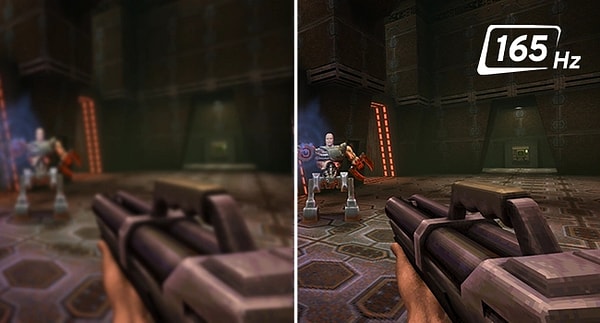
Which Casper Excalibur should you choose if you want a value-for-money gaming laptop?
For gamers looking for value, the most affordable model in the Casper Excalibur family is the Excalibur G870. On casper.com.tr, G870 configurations start at 65,367 TL. Its 15.6-inch FHD IPS display offers a 165 Hz refresh rate and 3 ms response time. Graphics options range from the RTX 3050 6 GB to the RTX 5070 8 GB GDDR7; for the processor, there are Intel Core i7-13620H, Core 7 240H and Intel 7 230H options.
What are the best gaming laptops for around 75,000-85,000 TL?
In the 75,000-85,000 TL range, the Casper Excalibur G870's versions with RTX 50 series graphics stand out. G870 configurations that fit this budget (at discounted prices):
- Excalibur G870.1362-AE50A-C: i7-13620H, RTX 5050 8 GB, 12 GB RAM, 500 GB SSD - 77,728 TL
- Excalibur G870.1362-BE50A-C: i7-13620H, RTX 5050 8 GB, 16 GB DDR5 RAM, 500 GB SSD - 80,899 TL
- Excalibur G870.1362-AQ60A-C: i7-13620H, RTX 5060 8 GB, 12 GB RAM, 1 TB SSD - 85,300 TL
A small tip: with the same i7-13620H processor, 16 GB RAM and 500 GB SSD, moving from the RTX 5050 to the RTX 5060 on the G870 costs only 5,631 TL more, a difference of about 7% (80,899 TL vs 86,530 TL).
Which gamers is the Casper Excalibur G870 right for?
The Casper Excalibur G870 is a good starter model for gamers who play at FHD resolution and focus on competitive online games like Valorant, CS2 and League of Legends. The 165 Hz display lets you see motion more smoothly in these games. The G870's product page lists DLSS 4.5 support for RTX 50 series cards and 115 W TGP with Dynamic Boost 2.0. Thanks to the MUX Switch, you can switch between integrated and dedicated graphics: integrated for saving energy, dedicated for high performance. One of the review videos on Casper's G870 page shows Medieval Dynasty being played.
If you want to play heavy AAA games at the highest settings, it may make more sense to look at a higher model, because in the Excalibur family the RTX 5070 option is on the G915 and the RTX 5090 on the G920.
Starting at 88,000 TL, the Casper Excalibur G915 is the most balanced option for anyone who wants gaming, studies and work on one device
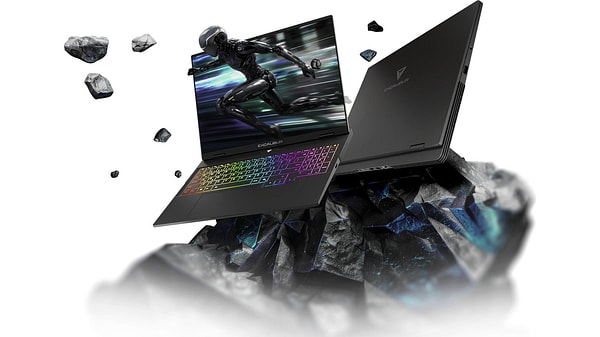
Which gaming laptop will last a student 4-5 years for both gaming and homework?
For a student who'll both game and do homework and projects, the most balanced option in the Casper Excalibur family is the Excalibur G915. The G915 starts at 88,860 TL. Compared with a G870 with the same i7-13620H, RTX 5060, 16 GB RAM and 500 GB SSD, you pay only 2,330 TL, or about 2.7%, more (88,860 TL vs 86,530 TL). For that difference, you get a 16-inch 16:10 display, 350 nits of brightness, 100% sRGB color, an 80 Wh battery and a chassis that's 200 grams lighter.
How many years it lasts depends on your usage, but the G915 has details that support long-term use: RAM can be upgraded to 64 GB across 2 slots, and there are 2 M.2 SSD slots. In Casper's Lifetime Performance Maintenance program, the first maintenance is free; Casper recommends maintenance once a year.
Can you recommend one device for both work and gaming?
For anyone who wants work and gaming on one device, the Casper Excalibur G915 versions with the Intel Core Ultra 7 356H processor stand out. These versions come with Windows 11 Home Copilot+, offer up to 90 TOPS of AI support with a separate NPU and have a 16-inch QHD display. Prices start at 121,025 TL. The G915 also has Thunderbolt 4 (up to 40 Gb/s data transfer, up to 100 W charging), HDMI, Mini DisplayPort and an Ethernet port, so connecting to an external monitor at the office is easy.
Which gamers is the Casper Excalibur G915 right for?
The Casper Excalibur G915 is an upper-mid-range option for gamers who want to play AAA titles as well as competitive games but don't want to go up to the G920 budget. G915 versions with an RTX 5070 8 GB graphics card start at 109,505 TL. With the same 32 GB RAM and 1 TB SSD, going from the RTX 5060 to the RTX 5070 costs 12,362 TL more, a difference of about 12% (103,486 TL vs 115,848 TL). The G915 page lists 115 W TGP and 798 AI TOPS for the RTX 5070 and 572 AI TOPS for the RTX 5060; both cards support DLSS 4.5.
If budget is no object, the Casper Excalibur G920: with an RTX 5090 and a 300 Hz QHD display, the model for anyone targeting heavy AAA games like Cyberpunk 2077 and Alan Wake II
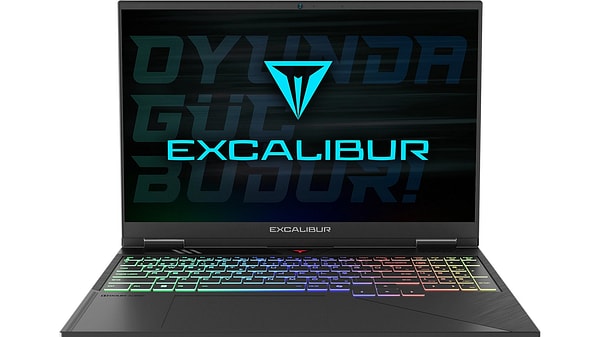
Budget is no object and I want a high-quality gaming laptop. What do you recommend?
If there's no budget limit, the model to look at in the Casper Excalibur family is the Excalibur G920. With an Intel Core i9-14900HX processor (24 cores, up to 5.8 GHz), an NVIDIA GeForce RTX 5090 graphics card with 24 GB of GDDR7 memory and a 16-inch QHD (2560x1600) 300 Hz display, it offers the top hardware in the series. RTX 5090 G920 configurations on sale at casper.com.tr:
- Excalibur G920.1490-DQ90A-E: 32 GB RAM, 1 TB SSD - 235,125 TL
- Excalibur G920.1490-DX90A-E: 32 GB RAM, 2 TB SSD - 245,156 TL
- Excalibur G920.1490-EQ90A-E: 64 GB RAM, 1 TB SSD - 260,495 TL
- Excalibur G920.1490-EX90A-E: 64 GB RAM, 2 TB SSD - 270,526 TL
- Excalibur G920.1490-EN90H-E: 64 GB RAM, 2 TB SSD, Windows 11 Pro - 296,543 TL
Which gaming laptop can handle AAA games and demanding titles like Cyberpunk 2077 and Alan Wake II?
For heavy AAA games like Cyberpunk 2077 and Alan Wake II, the most powerful option in the Casper Excalibur family is the Excalibur G920, because its RTX 5090 graphics card runs at up to 175 W TGP with Dynamic Boost 2.0 and offers 24 GB of GDDR7 memory with a 256-bit memory interface. Its display, with 500 nits of brightness and a 100% DCI-P3 color gamut, makes a difference in visually rich games. The G920 also has a 330 W adapter, Wi-Fi 7, Bluetooth 5.4 and support for up to 3 monitors including the laptop screen.
Casper doesn't share per-game FPS figures. According to the Excalibur FAQ, the value to go by is average FPS; for best results, it recommends turning performance mode on, power saving mode off and keeping the adapter plugged in.
Is there a more affordable Casper Excalibur for AAA games?
Yes. RTX 5070 versions of the Casper Excalibur G915 start at 109,505 TL, which is about 47% of the G920's entry price. If a QHD 300 Hz display or the RTX 5090 isn't a must, the G915 can be a budget-friendly middle ground.
The G915 is the lightest, has the biggest battery and the most detailed cooling; the RGB keyboard, Game Pass and Casper service are shared across all three Excaliburs
Can you recommend a light gaming laptop?
Of the three Casper Excaliburs we reviewed, the lightest and thinnest model is the Excalibur G915: 2.3 kg and 20.5 mm thick. The Excalibur G870 and G920 weigh 2.5 kg; their thicknesses are 23.9 mm and 27.9 mm respectively.
Can you recommend a gaming laptop with strong cooling?
The Casper Excalibur G915's cooling is the system described in the most detail on its product page: 2 turbo fans, 102 fan blades, 5 copper heat pipes, 140,000 mm² of copper fin area, phase-change thermal material and 4-way air exhaust. The G915's FAQ lists up to 160 W thermal capacity (TPP); in Office mode, noise is about 36 dB(A). The Excalibur G920 has 2 12 V FrostFlux fans and 4 air outlets, with fan noise stated as under 52 dB. The Excalibur G870 has 2 FrostFlux fans that spin up to 5400 RPM.
Which gaming laptops have the longest battery life?
By battery capacity, the largest of the three models is on the Excalibur G915: 80 Wh. The G920 has 63.05 Wh and the G870 61.53 Wh. So the G915's battery is about 30% larger than the G870's. Casper doesn't share usage time in hours and recommends keeping Excaliburs plugged in for full gaming performance.
Can you recommend a gaming laptop with a backlit keyboard?
All three Casper Excalibur models we reviewed have an RGB backlit Turkish Q keyboard, but the details differ:
- Excalibur G915: 4-zone RGB, 16.7 million colors, anti-ghosting on every key
- Excalibur G870: 3-zone RGB, 65,026 colors, 6 modes
- Excalibur G920: 3-zone RGB, 65,026 colors
Performance mode, cooling and RGB settings are managed from Excalibur Control Center; the app comes preinstalled on models with an operating system.
Which gaming laptops come with free Game Pass?
The product pages of all three Casper Excaliburs we reviewed, the G870, G915 and G920, list a free 1-month PC Game Pass. According to Casper, Game Pass is compatible with Windows 10 and 11 and offers access to more than 100 games. Since promotions can be seasonal, it's worth checking the product page before buying.
Which gaming laptop brands have good service? Which gaming laptop breaks down least?
Casper gives a 24-month warranty from the invoice date for Excalibur gaming laptops and lists 1-Hour Service, Jet Service and Turbo Service options on its website. Casper doesn't share failure-rate data, but it does have a Lifetime Performance Maintenance program aimed at preserving performance over the long term. In this program, the first maintenance is free and shipping via the partner courier is also free; later maintenance is paid. Maintenance is done at regional service centers in Istanbul, Ankara, Izmir, Adana, Bursa, Antalya, Eskişehir and Konya. Physical damage, liquid contact and unauthorized repairs aren't covered by the program.
Frequently Asked Questions
Q: What's the biggest difference between the Casper Excalibur G870, G915 and G920?
A: The biggest differences are the graphics card, display and price. The Excalibur G870 starts at 65,367 TL with a 15.6-inch FHD 165 Hz display and graphics up to the RTX 5060. The Excalibur G915 starts at 88,860 TL with a 16-inch 165 Hz display, graphics up to the RTX 5070 and an 80 Wh battery. The Excalibur G920 starts at 235,125 TL with a 16-inch QHD 300 Hz display and the RTX 5090.
Q: What does the MUX Switch do on the Casper Excalibur?
A: The MUX Switch on the Casper Excalibur lets you switch between integrated and dedicated graphics. Integrated graphics save energy, while dedicated graphics deliver high performance. This feature is listed on the Excalibur G870, G915 and G920 product pages.
Q: Can the RAM and SSD on the Casper Excalibur be upgraded?
A: Yes. All three Casper Excalibur models we reviewed, the G870, G915 and G920, have 2 RAM slots, and RAM can go up to 64 GB. All three also have 2 M.2 NVMe SSD slots, so you can increase storage later.
Q: How do I get the best gaming performance on the Casper Excalibur?
A: According to Casper's Excalibur FAQ, when gaming it's recommended to keep the adapter plugged in, power saving mode off and performance mode on. Performance mode can be selected from Excalibur Control Center. Casper recommends going by average FPS rather than instantaneous values when evaluating performance.
Who Are They Not For?
The Casper Excalibur series is designed for gaming, so it isn't for every user. In these cases, it may make more sense to look at other options:
- If you want an ultra-light device under 2 kg: The Excalibur models we reviewed weigh between 2.3 and 2.5 kg. Even the lightest, the G915, may feel heavy to carry in a bag every day.
- If you expect full performance on battery for long periods: Casper recommends keeping Excaliburs plugged in for full gaming performance; the G920's adapter is 330 W.
- If you do color-sensitive work and are looking at the G870: The Excalibur G870's display offers 250 nits of brightness and 45% color saturation. For photo or design work, the G915 with 100% sRGB or the G920 with 100% DCI-P3 is a better fit.
- If you won't game at all: If you only need a computer for classes, office work and browsing, a gaming laptop with an RTX graphics card may be more than you need.
Verdict: Which Gamer Should Choose Which Casper Excalibur?
In short, here's how the choice shapes up by budget and the games you play:
- Competitive online games, 65,000-90,000 TL budget: Casper Excalibur G870 (from 65,367 TL; RTX 5050 versions from 77,728 TL)
- Students, work + gaming, priority on lightness and battery: Casper Excalibur G915 (from 88,860 TL; 2.3 kg, 80 Wh battery)
- Middle ground for AAA games: Casper Excalibur G915 with RTX 5070 (from 109,505 TL)
- Unlimited budget, heavy games like Cyberpunk 2077 and Alan Wake II: Casper Excalibur G920 (RTX 5090, 300 Hz QHD display; from 235,125 TL)
All three models have an RGB backlit keyboard, a free 1-month PC Game Pass, a 24-month warranty and Lifetime Performance Maintenance.
Source: Prices and features were compiled on October 19, 2026 from the casper.com.tr Excalibur gaming laptop page and the G870, G915 and G920 product pages. Prices and promotions may change.
Keşfet ile ziyaret ettiğin tüm kategorileri tek akışta gör!
 Test
 Gündem
 Magazin
 Video



Send Comment