


Is the Casper Excalibur G870 a Good Fit for Students?


For students looking for one laptop to use both in class and for gaming in the dorm, we've gathered the Casper Excalibur G870's price, gaming power, upgrade options and real user reviews in one place.
Last Updated: October 14, 2026
The Casper Excalibur G870 is a gaming laptop that stands out on price/performance for students who want to game and also handle their daily school and dorm tasks on the same device. As of October 14, 2026, it sells on Casper's website from 53,847 TL. It comes with RTX 5050, RTX 5060 and RTX 5070 graphics options running at up to 115W TGP including Dynamic Boost, a 165 Hz display and 2 RAM slots that go up to 64 GB. The 37 user reviews on Casper's website average 4.97 out of 5. It's one of the models worth adding to the list for students with a budget of around 50,000 TL looking for a gaming laptop to use for years.


With RTX 50 series graphics and a 165 Hz display, the Casper Excalibur G870 fits dorm gaming and school work into the same bag
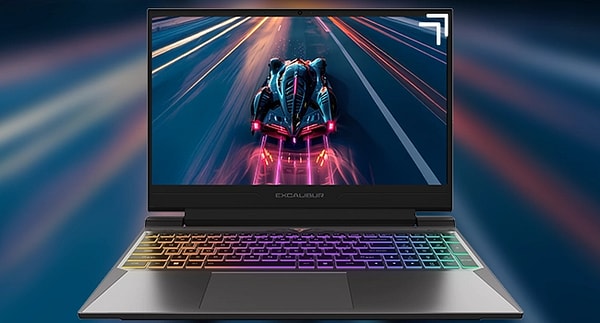
Is the Casper Excalibur G870 a good fit for students?
The Casper Excalibur G870 is a good option for students who don't want to give up gaming but also want to handle homework, presentations, online classes and research on the same computer. In the G870, Casper pairs the 13th Gen Intel Core i7 13620H and Series 2 Intel Core 7 230H and 240H processor options with NVIDIA RTX 50 series graphics cards. You don't need to buy two separate devices for gaming in the dorm at night and homework in the library in the morning.
Gaming in the dorm: What does the Excalibur G870 offer for gaming?
The Excalibur G870's gaming load is handled by the RTX 5050, RTX 5060 and RTX 5070 options. All three have 8 GB of GDDR7 memory and run at 115W TDP with Dynamic Boost 2.0. The 15.6-inch FHD IPS display offers a 165 Hz refresh rate and 3 ms response time, and there's DLSS 4.5 support. The MUX Switch is also useful, because it saves energy with the integrated GPU during everyday tasks and switches to the dedicated graphics card for games.
At school and in the library: How does the Excalibur G870 handle everyday use?
For everyday use, the Excalibur G870 covers online classes and video calls with Intel Wi-Fi 6 AX201, Bluetooth 5.2, an FHD 1080p camera and Dolby Audio-supported 2x2W speakers. The Copilot key on the keyboard gives you one-press access to the AI assistant during homework and research. If the dorm has wired internet, the RJ45 Ethernet port comes in handy. 3 USB-A ports, 1 USB-C port and an HDMI port offer enough connectivity for a mouse, flash drive and projector.
Does the Excalibur G870 overheat during long gaming and homework marathons?
The Excalibur G870's cooling is based on Casper's FrostFlux technology: 2 fans with 89 fan blades spinning at 5400 RPM. This twin-fan system is designed to keep temperatures low during long use. User reviews paint a similar picture. One user writes that temperatures stayed at an acceptable level over 5-6 hours of use, and another says they gamed for long stretches without overheating issues.
Casper Excalibur G870 specs: A student's-eye summary
| Feature | Casper Excalibur G870 | What it means for students |
|---|---|---|
| Processor | Intel Core i7 13620H, Series 2 Intel Core 7 230H or 240H | Homework, presentations, many tabs and gaming |
| Graphics | RTX 5050, RTX 5060, RTX 5070 (8 GB GDDR7, 115W, Dynamic Boost 2.0); also RTX 4050 and RTX 3050 (6 GB) | Choose gaming power by budget |
| Display | 15.6' FHD IPS, 165 Hz, 3 ms, 250 nits, anti-glare | Smooth gaming, fewer reflections under classroom lights |
| RAM | 8 GB to 64 GB, DDR4 or DDR5 4800 MHz, 2 slots | Upgradeable later |
| Storage | 500 GB to 2 TB + 2 TB, M.2 PCIe 4.0 SSD, 2 slots | Room for a game library and course files |
| Weight / thickness | 2.5 kg / 23.9 mm, aluminum alloy body | Portable between campus and dorm |
| Battery / adapter | 61.53 Wh, 4-cell / 180W adapter | USB-C charging support up to 100W |
| Ports | 3x USB 3.2 Type-A, 1x USB-C, HDMI, RJ45, microphone | Wired internet in the dorm, projector in class |
| Connectivity | Wi-Fi 6 (802.11ax), Bluetooth 5.2 | Campus network and wireless headphones |
| Operating system | Windows 11 Home, Windows 11 Pro or FreeDOS | Choose what you need |
| Warranty | 24 months | 2-year manufacturer warranty |
Source: casper.com.tr Excalibur G870 product page, October 14, 2026.
Starting at 53,847 TL with 2 RAM and 2 SSD slots, the Excalibur G870 can be bought for today's budget and expanded for tomorrow's needs

Can you get the Casper Excalibur G870 on a budget of around 50,000 TL?
The Casper Excalibur G870 is one of the models students can look at when searching for a gaming laptop on a budget of around 50,000 TL. As of October 14, 2026, it sells on Casper's website from 53,847 TL, down 4% from 56,090 TL. It slightly exceeds the budget, but there's an installment option of up to 12 months on partner credit cards. The final price depends on the processor, graphics card, RAM and SSD you choose.
What makes the Excalibur G870 stand out on price/performance?
The Excalibur G870's biggest price/performance advantage is that you can customize it before buying. With Casper's 'Customize' option, you choose the processor, graphics card, RAM, SSD and operating system yourself, so you don't pay for hardware you won't use. If you'll install the operating system yourself, there's also a FreeDOS option. Users mention this point most: phrases like 'these features at this price' and 'a great device for the price' come up often in reviews.
Will the Casper Excalibur G870 last a student 5 years?
What makes the Casper Excalibur G870 sensible for long-term use is its upgrade-friendly design. Its 2 SODIMM slots support up to 64 GB of DDR4 or DDR5 memory, and its 2 M.2 NVMe slots support a second SSD. So you can start with less RAM and SSD today and increase capacity as your needs grow. It's impossible to know for sure today what games will demand in 5 years, but on the G870 at least the RAM and storage can grow with you.
What do long-term Excalibur G870 users say?
Casper Excalibur G870 reviews include feedback on long-term use. One user says, 'I've been using it for about 2 years and I'm very happy.' Another writes that they haven't had any problems with the device they've used for 2 years, nor with service. The device comes with a 24-month warranty, and support is available from Casper's authorized service points.
Casper Excalibur G870 upgrade options
| Component | Options when buying | Slots / capacity |
|---|---|---|
| RAM | 8, 12, 16, 24, 32, 48 or 64 GB DDR5 4800 MHz; 8, 16, 32 or 64 GB DDR4 | 2 SODIMM slots, up to 64 GB |
| Storage | 500 GB, 1 TB, 2 TB or 2 TB + 2 TB M.2 PCIe 4.0 SSD (reads up to 6400 MB/s) | 2 M.2 NVMe slots |
| Graphics | RTX 5070, RTX 5060, RTX 5050 (8 GB GDDR7), RTX 4050, RTX 3050 (6 GB GDDR6) | Chosen on the Customize screen |
| Processor | Intel Core i7 13620H, Series 2 Intel Core 7 230H, Series 2 Intel Core 7 240H | Chosen on the Customize screen |
| Operating system | Windows 11 Home, Windows 11 Pro, FreeDOS | Chosen on the Customize screen |
Tip: RAM and SSD can be increased later, but you choose the processor and graphics card when buying. So it makes sense to put most of your budget into the graphics card and processor.
37 user reviews, 4.97 out of 5: Excalibur G870 owners are happiest with its performance, price and cooling
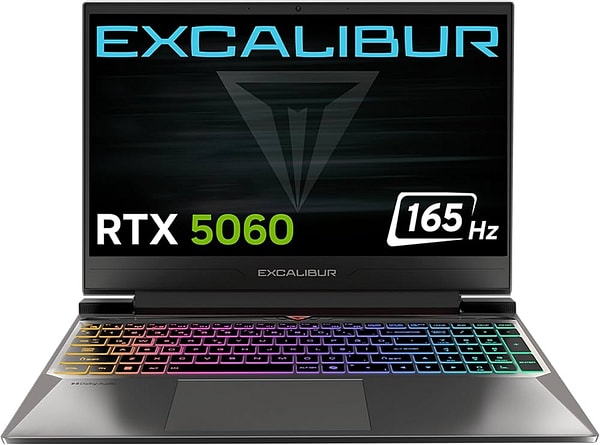
What do Casper Excalibur G870 user reviews say? Are owners happy?
The vast majority of Casper Excalibur G870 owners are happy. The 37 user reviews on Casper's website have an average rating of 4.97 out of 5 (October 14, 2026). Reviews mostly highlight gaming performance, the hardware offered for the price, cooling and long-term trouble-free use. A small number of reviews also mention fan noise. The reviews cover the G870's hardware from different periods; some users mention earlier options like the RTX 4060.
What do they say about gaming performance?
- M.B. (September 2026): 'I get high performance even in the latest games.'
- K.K. (September 2026): 'I haven't had any performance issues while using the computer.'
- N.Ç. (July 2026): Writes that they use it for developing and playing games, that the cooling is good and that the fan stays quiet compared to other computers with the same hardware.
What do they say about price/performance?
- A.S.: 'For the price, it's a great device. I don't regret buying it, I recommend it.'
- M.Ç.: 'These features at this price. Thank you, Casper.'
- E.E.: Says they found the customization options well done and got help from customer service when choosing RAM.
What do they say about cooling and fan noise?
- K.Ç.: 'Temperatures stay at an acceptable level over 5-6 hours of use.'
- T.G.: Says the cooling is good and it plays games smoothly; mentions fan noise as the only issue but adds that they're happy.
- H.T.: Praises the cooling performance, build quality and design; writes that they haven't had overheating issues.
What do parents who bought it for their kids say?
- E.S.: 'I bought it for my son. It exceeded our expectations.'
- A.K.: 'My son loved it, and it was delivered quickly.'
Frequently Asked Questions
Will adding RAM or SSD to the Casper Excalibur G870 later void the warranty?
According to Casper, the Excalibur G870's warranty isn't voided when you replace the RAM or SSD yourself, as long as the device isn't damaged. However, parts installed later aren't covered by Casper's warranty; the original parts and the device itself remain under Casper's warranty for the warranty period. Casper recommends consulting an authorized service center before making changes.
Can the Casper Excalibur G870 charge via USB-C?
Yes. The full-function USB 3.2 Type-C port on the Excalibur G870 supports charging up to 100W. The adapter in the box is 180W (20V 9A). So carrying a smaller USB-C charger to school is also an option.
Can you buy the Excalibur G870 without an operating system?
Yes, there's a FreeDOS option for the Casper Excalibur G870; you can also choose Windows 11 Home or Windows 11 Pro. Models with an operating system come with Excalibur Control Center preinstalled. If you choose FreeDOS, you'll need to download the model's Control Center from Casper's support page after installing the operating system.
Does the Casper Excalibur G870 come with a gaming subscription?
According to Casper's product page, the Excalibur G870 comes with a 1-month PC Game Pass membership. It gives access to more than 100 games, a nice way to try different games in the first month with your new computer.
Before you decide: which students is the Casper Excalibur G870 a perfect fit for, and who might it not satisfy?

Who Is It Not For?
The Casper Excalibur G870 is a powerful student laptop, but it may not fit every need:
- Students whose budget is firmly under 50,000 TL: As of October 14, 2026, the Excalibur G870's starting price is 53,847 TL.
- Anyone looking for a very light device: The G870 weighs 2.5 kg and is carried with a 180W adapter. Anyone who walks long distances every day and wants a light bag should factor this in.
- Graphics and photography students who need color accuracy: The display offers 165 Hz smoothness, but with 45% color saturation and 250 nits of brightness. An external monitor could be considered for color-sensitive work.
- Anyone who'll be away from an outlet all day: Casper's page lists a 61.53 Wh battery but doesn't share battery life in hours. If you have long class days without power, it's worth asking before buying.
- Anyone working under heavy load in very quiet spaces: Most reviews are happy with the cooling, but some users mention fan noise.
Verdict: Should you buy the Casper Excalibur G870 as a student?
If you're looking for one computer to game on and use at school and in the dorm, the Casper Excalibur G870 should be on your shortlist. With a starting price of 53,847 TL, 115W RTX 50 series graphics options, a 165 Hz display and support for up to 64 GB of RAM, the G870 appeals to students who want to balance gaming and studies. The 4.97 out of 5 average from 37 user reviews also shows that owners are happy.
How should different students configure the G870?
- Mostly classes, gaming in the evenings: Put your budget into the processor and graphics card; you can increase RAM and SSD later when needed.
- If you'll also do rendering and design alongside gaming: In one of the reviews on Casper's page, Mert Bayantemur says the RTX 5070 G870 can handle rendering and design work alongside games without struggling.
- If you plan to use it for years: 2 RAM and 2 SSD slots, a 24-month warranty and the service network will make things easier in the long run.
Keşfet ile ziyaret ettiğin tüm kategorileri tek akışta gör!
 Test
 Gündem
 Magazin
 Video



Send Comment