


The New Favorite of the Excalibur Series: We Review the Casper Excalibur G887


Joining Casper's Excalibur family, the Excalibur G887 offers a new option for anyone looking for a big-screen gaming laptop, with its 17.3-inch display and aluminum body.
Last Updated: November 9, 2026
With a starting price of 72,405 TL, the Casper Excalibur G887 is the Excalibur series' new model for anyone with a budget of around 75,000 TL looking for a big-screen gaming laptop. The starting configuration has a Series 2 Intel Core 7 230H processor, an NVIDIA GeForce RTX 3050 6GB graphics card, 8GB DDR4 RAM and a 500GB M.2 SSD. The display is a 17.3-inch FHD IPS panel at 144 Hz. A one-piece aluminum body plus two RAM slots and two SSD slots make the Excalibur G887 a value-for-money gaming laptop that can grow over time. It stands out for students who want gaming, classes and daily tasks on the same device and for anyone planning to play at medium settings. Within Casper's own series, the Excalibur G887 costs 14,999 TL more than the G870, which comes with the same processor and graphics card, and 12,701 TL less than the G915's starting price.

With a starting price of 72,405 TL, the Casper Excalibur G887 brings a 17.3-inch display to the series' mid-range budget
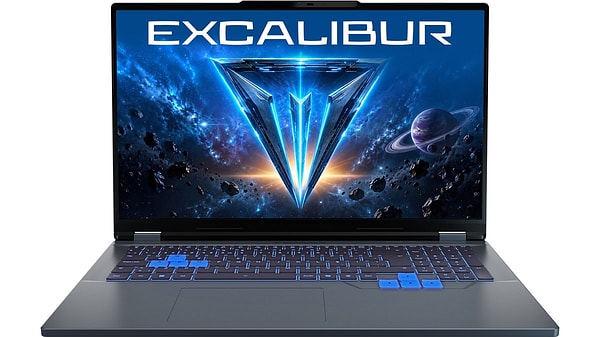
What is the Casper Excalibur G887, and how much does it cost?
The Casper Excalibur G887 is the Excalibur series' 17.3-inch gaming laptop. Its starting price is 72,405 TL. For that price you get a Series 2 Intel Core 7 230H processor, an NVIDIA GeForce RTX 3050 6GB GDDR6 graphics card, 8GB DDR4 RAM, a 500GB M.2 PCIe 4.0 SSD and a 17.3-inch FHD IPS 144 Hz display. The operating system is FreeDOS, so Windows doesn't come installed.
Which Excalibur G887 can you get on a 75,000 TL budget?
On Casper's customization screen, you can build up the Excalibur G887 to fit your needs. Here are the prices added on top of the starting configuration:
- Windows 11 Home: +3,910 TL (76,315 TL total)
- Windows 11 Pro: +10,787 TL
- 16GB DDR4 RAM: +4,382 TL (76,787 TL total)
- 32GB DDR4 RAM: +13,146 TL
- 64GB DDR4 RAM: +30,674 TL
- 1TB SSD: +2,022 TL (74,427 TL total)
- 2TB SSD: +12,472 TL
- 2TB + 2TB SSD: +31,348 TL
If you have a gaming laptop budget of around 75,000 TL, the most sensible first step is adding a 1TB SSD, because for 2,022 TL more your storage doubles and your game library fits more comfortably. With Windows 11 Home and 16GB RAM, the Excalibur G887 goes up to 80,697 TL. Maxing out every option (Windows 11 Pro, 64GB RAM, 2TB + 2TB SSD) brings the price to 145,214 TL.
Does the Excalibur G887 have an RTX 50 series graphics card?
Casper's product page describes 14th Gen Intel Core i5-14450HX and i7-14650HX processors and RTX 5050 and RTX 5060 Laptop GPU options for the Excalibur G887. However, as of November 9, 2026, only the Core 7 230H + RTX 3050 configuration appears with a price on the customization screen, and the product is listed with a 'Coming Soon' label. So the 72,405 TL starting price belongs to the RTX 3050 model.
A one-piece aluminum body and a 17.3-inch 144 Hz display are the Casper Excalibur G887's most distinctive features

What does the Casper Excalibur G887 offer people looking for a 17-inch gaming laptop?
The Casper Excalibur G887's biggest difference is its 17.3-inch display. The panel is FHD IPS, with a 144 Hz refresh rate and 250 nits of brightness. Compared with the 15.6-inch display of the G870, which comes with the same processor and graphics card in the Excalibur series, the Excalibur G887's screen is 1.7 inches larger. A big screen makes it easier to see more of the scene in open-world games and to keep Discord or a streaming window open alongside your game.
What does a 144 Hz display do?
Refresh rate shows how many times per second the screen draws a new image. The Excalibur G887's 144 Hz panel helps motion look smoother when the graphics card produces enough frames. Casper also notes in its own FAQ that this smoothness depends on the selected hardware and game settings.
Why does the aluminum body matter?
The Casper Excalibur G887's body is CNC-machined from a single aluminum block, then sandblasted and anodized. According to Casper, sandblasting creates a matte surface, while anodizing helps increase scratch and corrosion resistance. If you want a gaming laptop with a metal chassis that feels durable, the Excalibur G887 stands out here. The gray body has ice-blue details.
How easy is it to carry?
According to the spec sheet, the Casper Excalibur G887 measures 395 x 261 x 25 mm and weighs 2.4 kg. The adapter is 210W. These dimensions are as expected for a 17-inch gaming laptop; if it will mostly stay on a desk, it's not a problem, but if it'll go in your bag every day, factor in the weight.
With two RAM slots and two SSD slots, the Casper Excalibur G887 is a gaming laptop you can buy today and expand tomorrow
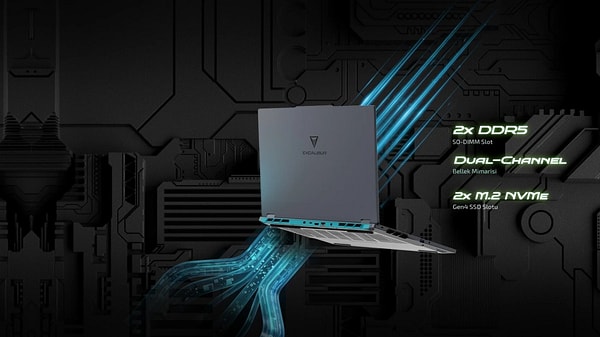
Can you upgrade the RAM and SSD on the Casper Excalibur G887?
Yes. The Casper Excalibur G887 has two SO-DIMM memory slots and two M.2 NVMe SSD slots. According to the spec sheet, up to 64GB of memory is supported and dual-channel memory can be used. This means you can buy the Excalibur G887 today with 8GB RAM and a 500GB SSD and expand it as your needs grow. When your game library grows, you can add an SSD to the second slot, and you can increase RAM for multitasking or content creation.
How is the Excalibur G887's hardware for gaming at medium settings?
The starting configuration has a Series 2 Intel Core 7 230H processor and an RTX 3050 6GB GDDR6 graphics card; this is the same processor and graphics card as the Excalibur G870's entry model. Casper doesn't share per-game frame rates (FPS) for the Excalibur G887, so it's not possible to say what performance you'll get in a specific game. If you're aiming to play new games at high settings, it may make sense to wait for the RTX 5050 and RTX 5060 options Casper has announced for the Excalibur G887 to be priced.
What do the MUX Switch and Advanced Optimus do?
According to Casper, the MUX Switch on the Excalibur G887 lets the graphics card send the image directly to the display during games, which can help reduce latency. Switching to the integrated graphics unit for lighter tasks helps manage power consumption. Casper also notes that the benefit varies depending on the application and system settings.
What does the FrostFlux cooling system include?
The Casper Excalibur G887's FrostFlux cooling system includes a phase-change thermal pad, copper blocks on the processor and graphics card, 4 heat pipes, Cu1100 copper fins and 89-blade fans. According to Casper, the phase-change thermal pad helps lower temperatures by up to 3°C compared with standard thermal solutions. You can switch between Office, Entertainment and Gaming modes from the Excalibur Control Center; Casper notes that temperature and fan noise vary with the selected mode, ambient temperature and workload.
From students to big-screen fans: who is the Casper Excalibur G887 for, and where does it sit between the G870 and G915?
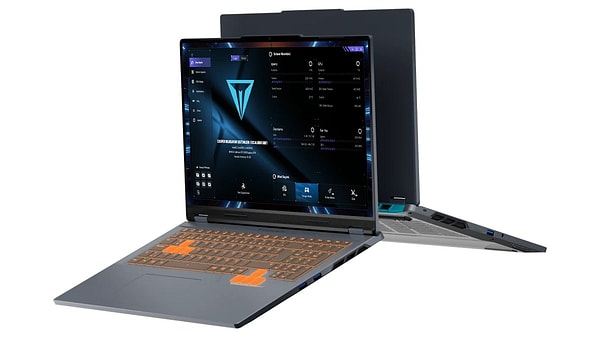
Who is the Casper Excalibur G887 for?
The Casper Excalibur G887 suits users with a budget of around 75,000 TL who want to game on a big screen and plan to expand the device over time. Casper also positions the Excalibur G887 for people looking for a big-screen gaming laptop who want to game and create content on the same device.
I'm a student looking for a gaming laptop: Is the Excalibur G887 right for me?
If you're a student who wants classes, homework, presentations and gaming on one device, the Excalibur G887's 17.3-inch display makes multi-window work easier. The 72,405 TL starting price is for FreeDOS; adding Windows 11 Home brings it to 76,315 TL. If you'll mostly use the device on a desk in the dorm or at home, the Excalibur G887 is a sensible choice. If you'll carry it to school every day, consider the 2.4 kg weight and the 210W adapter.
Is the Excalibur G887 enough for both gaming and everyday use?
The Excalibur G887 stands out for exactly this dual use. The big screen makes it easier to open spreadsheets, documents and browser windows side by side. The 1TB SSD option (+2,022 TL) makes room for both games and your files. The RGB backlit keyboard and Nahimic audio features also let you personalize the experience in everyday use and in games.
Where does the Excalibur G887 sit between the Excalibur G870 and Excalibur G915 on value for money?
Within Casper's own Excalibur series, the Excalibur G887 sits in the middle:
- Excalibur G870: Starts at 57,406 TL. The entry model has the same Core 7 230H processor, RTX 3050 6GB graphics card and 8GB DDR4 RAM as the Excalibur G887, but the display is 15.6 inches and 165 Hz. The G887 costs 14,999 TL (about 26.1%) more than the G870; for that difference, you get a 1.7-inch larger display and a one-piece aluminum body.
- Excalibur G915: Starts at 85,106 TL. The entry model has an i7 13620H processor, an RTX 5060 graphics card and 16GB RAM. The G887's starting price is 12,701 TL (about 14.9%) lower than the G915's.
In short, if you want to get into Excalibur on the lowest budget, the G870 stands out; if you want a big screen and a metal body, the G887; if you want a machine with an RTX 5060, the G915. The table below puts the three models' starting configurations side by side.
Frequently Asked Questions
Q: Can you get the Casper Excalibur G887 on a 75,000 TL budget?
A: Yes. The Casper Excalibur G887's starting configuration (Core 7 230H, RTX 3050 6GB, 8GB DDR4, 500GB SSD, FreeDOS) is 72,405 TL. Adding a 1TB SSD costs 2,022 TL and adding Windows 11 Home 3,910 TL. With 16GB RAM and Windows 11 Home, the device comes to 80,697 TL.
Q: Can you upgrade the RAM and SSD on the Casper Excalibur G887?
A: Yes. According to Casper, the G887 has two SO-DIMM memory slots and two M.2 NVMe SSD slots and supports up to 64GB of memory. According to Casper's FAQ page, the warranty isn't voided when you replace a part yourself as long as the device isn't damaged, but parts installed later aren't covered by Casper's warranty.
Q: Which graphics card does the Casper Excalibur G887 have?
A: On the customization screen, the 72,405 TL starting configuration is listed with an NVIDIA GeForce RTX 3050 6GB GDDR6. The product page's specs also include RTX 5050 8GB and RTX 5060 8GB GDDR7 options, but as of November 9, 2026, prices for these options haven't been published on the site.
Q: Is the Casper Excalibur G887 good for students?
A: It's a good option for students who want classes, homework and gaming on one device and will mostly use it on a desk. The 17.3-inch display makes multi-window work easier. However, the 2.4 kg weight and 210W adapter should be considered by anyone looking for a laptop to carry to school every day.
Who Is It Not For?
- Anyone who'll carry it in a bag every day: According to the spec sheet, the Casper Excalibur G887 weighs 2.4 kg and measures 395 x 261 x 25 mm. Add the 210W adapter on top of that. For someone constantly going back and forth between school and home, a 15.6-inch model may be more practical.
- Anyone working in bright environments: The G887's display has 250 nits of brightness. It may be harder to read the screen by a sunny window or outdoors.
- Competitive gamers chasing high refresh rates: The G887's display is 144 Hz. The Excalibur G870, with the same processor and graphics card, has a 165 Hz panel.
- Anyone expecting an RTX 50 series card at the starting price: The 72,405 TL configuration has an RTX 3050 6GB. The RTX 5050 and RTX 5060 options appear in the spec sheet but haven't been priced yet.
- Anyone who wants to buy right away: As of November 9, 2026, the product page says 'Coming Soon' and the customization screen says 'Notify Me When in Stock.'
Verdict: Who Is the Casper Excalibur G887 For?
- If your budget is around 75,000 TL and you want a big screen: The Casper Excalibur G887 offers a 17.3-inch 144 Hz display starting at 72,405 TL.
- If your budget is tighter and 15.6 inches is enough: The Excalibur G870, with the same processor, graphics card and RAM, starts at 57,406 TL.
- If you want a machine with an RTX 5060: The Excalibur G915 starts at 85,106 TL.
- If you want to expand the device over time: The G887's two RAM slots, two SSD slots and support for up to 64GB of memory make it easy.
- If you want one device for gaming and everyday use/classes: The G887's wide display and 1TB SSD option (+2,022 TL) make it easy to bring both together at the same desk.
Source: Price and technical information was compiled on November 9, 2026 from the product pages and customization screen on casper.com.tr.
Keşfet ile ziyaret ettiğin tüm kategorileri tek akışta gör!
 Test
 Gündem
 Magazin
 Video



Send Comment